
How should plumbing licenses be organized?
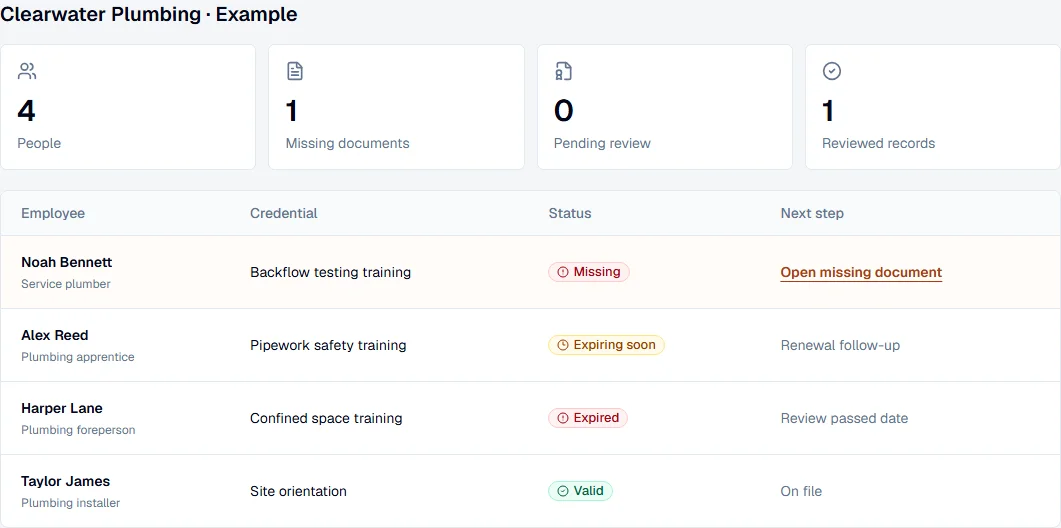
Organize each plumbing license around the holder, credential type, number, issuing authority, document, and applicable dates. This structure makes the record searchable and keeps a renewal document from becoming detached from the person and license it supports.
Why record the issuing authority?
Professional licensing is generally handled by state or local authorities, so the issuer is essential context. QualiRoster stores the authority and jurisdiction details your team provides rather than assuming one renewal rule applies everywhere.
- Use the authority’s current guidance as the source of truth.
- Record evidence alongside the data entered from it.
- Separate missing data from a genuinely expired license.
Replace email chasing with a review queue
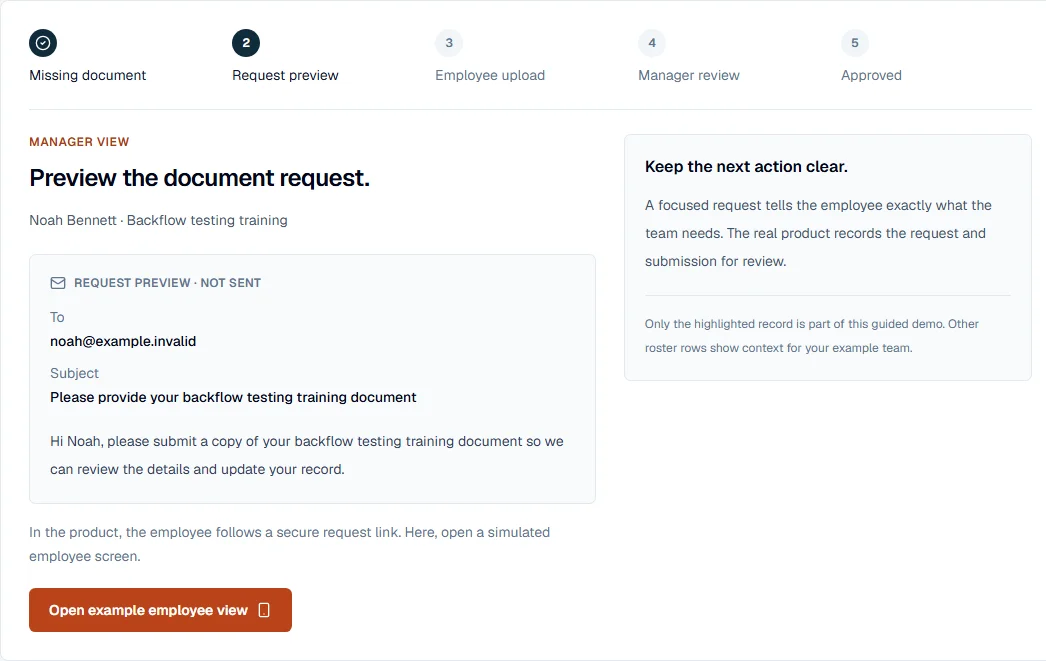
A secure credential request gives the plumber a clear upload task. The administrator can review the submission, confirm the relevant fields, and accept or reject it without searching through a shared inbox.
For a complete worker record beyond the plumbing license, explore employee credential tracking for plumbing teams and keep certifications and renewal evidence together.
Use plumber license tracking software before dispatch
A plumbing supervisor needs to see which person holds the license, whether evidence is on file, and what needs review before scheduling the crew. Keep apprentices, journeymen, master plumbers, and business credentials distinguishable using the categories relevant to your jurisdiction; a shared company folder does not explain each worker’s record.
- Record the exact credential category, number, issuer, and actual expiration date.
- Request missing or renewed evidence from the plumber through a secure upload link.
- Review pending renewals and unresolved scope questions before treating the record as complete.
Build the register with the plumbing license tracking checklist and its selected state guides.
How to verify a plumbing license and retain the evidence
To verify a plumbing license, start with the issuing authority’s official lookup. Match the name and license number, check the credential category, current standing, and expiration shown, and retain the result and review date. QualiRoster stores the evidence and renewal workflow; it does not automatically verify licenses against board databases.
For the selected Texas credential, follow the Texas plumber license verification checklist before recording the result.
For Washington coverage, use the Washington plumber credential review and its official sources.
A plumber license expiration example: from deadline to accepted renewal
Suppose a fictional plumber’s license document shows an expiration date of December 31, 2026. Record that date and the issuing authority on the plumber’s record. At the 30-day checkpoint on December 1, ask the holder for renewal evidence; at the 14-day checkpoint on December 17, review what is still outstanding.
- Keep the saved expiration date unchanged while a renewal application or document is pending.
- When the new document arrives, compare the holder, license number, issuer and new expiration date before accepting the update.
- If the deadline passes without accepted evidence, review the record and the authority’s current standing before scheduling affected work. A stored date does not establish permission to work.
Use the employee license expiration workflow to define your review cadence and handle unknown dates.
A practical workflow for a plumbing office and field crew
Start with the plumber roster you already maintain. Add the credential categories and issuing authorities relevant to your team, connect the evidence, then review the same queue each week so a pending document does not get mistaken for a completed renewal.
- 1. Import people and credential rows from CSV, or enter the first records manually.
- 2. Confirm each license number, authority and written date; separate business credentials from individual credentials.
- 3. Review missing, upcoming and expired records, and decide who will follow up with each holder.
- 4. Send a secure document request and have an authorized reviewer approve or reject the submission.
- 5. Use the accepted record and supporting evidence for the next workforce review.
See how credential renewal reminders support follow-up between office reviews.
Explore employee document collection for the request, upload and review steps.
Frequently asked questions
Can I track several licenses or endorsements for one plumber?
Yes. Keep each credential as a separate record under the employee, with its own issuer, evidence, and dates. The contractor should confirm which categories and endorsements apply to the planned assignment.
Does a renewed document immediately update the plumber’s record?
No. The submitted renewal waits for an authorized reviewer to confirm or correct the details and approve it. A receipt or uploaded card alone does not prove that the authority has updated the license standing.
Does plumber license tracking replace a state license search?
No. Use the official authority search for current standing and scope. QualiRoster helps you keep the result with the worker’s documents and follow up on the expiration date recorded by your team.
Official sources
- USA.gov professional licenses
Official guidance for finding state licensing requirements and agencies.
- Texas State Board of Plumbing Examiners: consumer information
Official access to the Texas public license search.
- Washington L&I: Verify a Contractor, Tradesperson or Business
Official lookup for Washington contractor and tradesperson records.